
Overview
This application is developed to empower people to learn new vocabulary so that individuals are able to communicate better and feel more confident in their professional and daily life.
Hypothesis
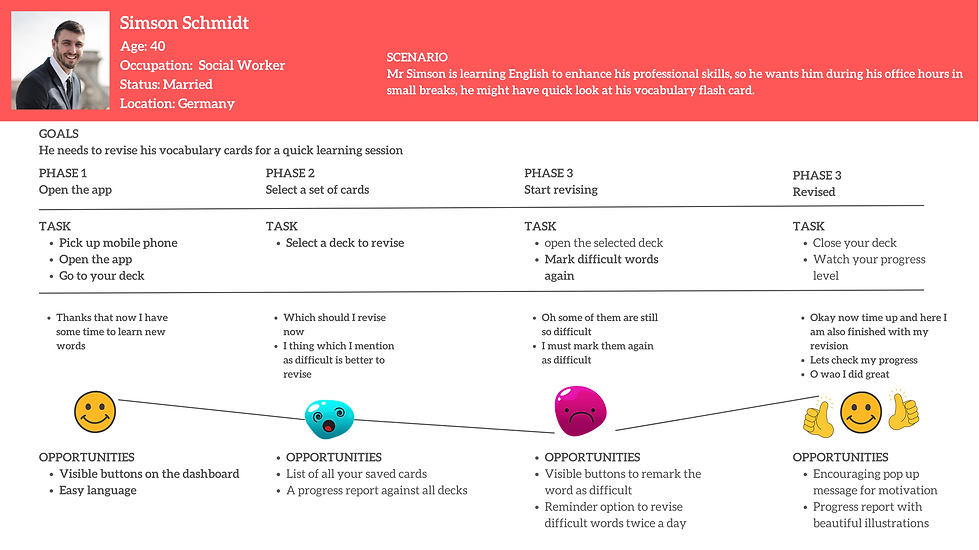
We believe that building an interface which is easy to use, covers multiple languages and consists of different types of small tasks, including audio and video aids can help Simson achieve his goals to improve his language skills.
Role
UX researcher
UX designer
Tools
Marvel
Draw.io
Duration
Feb - March 2022
Process
Competitive
analysis
User research
User persona
User flows
Prototype
Usability test
Interactive design
Competitive Analysis
To understand the market prospective, I did the competitive analysis of the following three highly rated application available in the market.

Knudge.me

English Vocabulary

Vocabulary Bilder (Magoosh)


Knudge.me
Navigation:
Pros:
•Menu bar is visible
•Setting your potential goals can be easily adjustable
Cons:
•It is difficult to differentiate between ads and your objective
•Less space is available for the objective of the app.
Learning Experience:
Pros:
•It has many options to improve your vocabulary games, tests, and bookmarking system.
•You can create your challenges and then you can play online
with your friends as well
•It gives a complete elaboration of the word
•You can partially use it offline
Cons:
•Very little amount of data is available in the free version.
•No voice option for checking pronunciation.
English Vocabulary
Navigation:
Pros:
•Very clear and visible menu
•No distractions of adds
•Always ask before quit
•Clear options for setting your daily goals
Corns:
•Its annoying to be asked every time before excite
Learning Experience:
Pros:
•It covers all the language skills, reading, writing, speaking and listening
• It's a visual app that's why anyone could have an better
understanding and easy to memorise.
•It gives Language options as well, to understand the word in
your language
•It has a test system and gives your test result very clearly
•Flash cards are available
•Different view sizes available with different background colour
Cons:
•Its a visual app, so covered only vocabulary about nouns
•It is a very basic vocabulary app
•You cannot create your cards
•You cannot register that's why you cannot Personalise your data.


Vocabulary Bilder (Magoosh)


Navigation:
Pros:
•Main display is very visible and clear. It's easy to select your
required level.
•Menu bar is also clearly visible on the left top
Cons:
•Menu bar gives no information about what study tools are available
Learning Experience:
Pros:
• Professional vocabulary is given
•Voice option is available for pronunciation check
•Different vocabulary levels are given
•You can use it offline as well
Cons:
•Only one type of task is given
•No options for notifications and setting goals
•Only covers professional-level vocabulary
User Research
User Interviews

Noma Esmer
Gender: Female
Age: 40
Education: Master in English Literature
Profession: Teaching at Secondary Level School
Hobby: Reading, Painting, Designing

Adam Smith
Gender: Male
Age: 42
Education: MBBS, FRCS
Profession: Doctor (General Surgeon)

Alisha Tanveer
Gender: Female
Age: 37
Education: Bachelors in Economic
Profession: Student
Interviews Insight

1
Doing
-
I am participating in online discussion forums to enhance my speaking skills.
-
I am also using vocabulary mobile apps.
-
I love reading books to improve my language skills.
-
I made a vocabulary list of new words and learnt them again and again.
-
I used text translations in my language to understand better.
-
I made and still have a word board in my workplace, where I write new words and see them all the time.
-
I used game challenges to improve my vocabulary and grammar as well.
-
I took notes of important grammar points by hand.
2
Feeling
-
I feel that when I meet native speakers, helps me a lot.
-
Recording my voice and then pointing out my own mistakes has improved my speaking power and vocabulary as well.
-
I was always motivated in doing new things that’s why it is easy for me to adapt new ways of learning
-
I feel that I cannot memorise the new words in my long time memory unless I use them in real life.
-
I have a better understanding of words when I see an exemplary sentence.
-
I can memorise better when I write the words on solid paper.
3
Thinking
-
I think travelling in different parts of the land and understanding different accents of your desired language is very convenient.
-
I think working in 1 to1 session also helps very much.
-
I think using language challenge games is very helpful.
-
I think using spelling corrector apps helps to improve your writing skill.
-
I suggest using memory cards is more helpful than making a list of new words.
-
Making proper study plans leads to success.
-
I think giving positive feedback encourages all age groups.
User Persona

Mental Model
User flows & Wireframes
1. Play Game With Friends
Entry Point:
Open an App and the ee splash screen.
Success Point:
Plagamesme with fellows and get results.
User Story: As Simson, I want to create and play game challenges with my classmates
Task Analysis:
-
Open App, splash screen
-
Login to your account
-
Home page
-
Select your already decided level, for example, “Advanced level”
-
Go to challenges
-
Select create your game
-
Select your desired game
-
Create a code
-
Share code via email, WhatsApp, SMS
-
Select Start Game
-
After the game is over you will see your Scoreboard

2. Review Vocabulary Deck
Entry Point:
Open App and see the splash screen.
Success Point:
Review your deck and get results.
User Story: As Simson, I want to review my vocabulary deck.
Task Analysis:
-
Open App, splash screen
-
Login to your account
-
Home page
-
Go to your selected level for example “Advanced level”
-
Select review your deck cards
-
Get your achievement card after reviewing your vocabulary

Prototype
Low Fidelity Prototype
Play Game With Friends
Review Vocabulary Deck


Mid Fidelity Prototype


Usability Testing
A usability test has been performed with the help of three competent volunteers and the evaluation has been categorised according to the matrices of severity. After that, major difficult problems with urgency were sorted out.
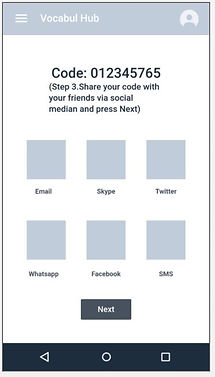
1. Problem with matrix 4
Problem
It is not clear after sharing your code with others, how the screen leads to playing any game screen.
Solution
Add a “Next” button to clear the process.
2. Problem with matrix 3
Problem
The terminology of “review starred” is a bit confusing
Solution
Use Understandable words like “review difficult vocabulary”.


Interactive Design

Learning
Each step is challenging and important. but the usability test is the heart of all your efforts during the design process Keep correcting your design without annoying until you make it.